

Mastering Disaster Recovery - Part 5 - Is it really a snapshot?

I have been a part of the backup and disaster recovery industry for about 6 years now. I have contributed to open source projects and also worked on enterprise scale deployments of backup and disaster recovery.
One problem that I have seen overlooked more often than not and that is the “Online Backup Problem”. This one problem causes more recovery issues than anything else. Because the recovered data is either corrupt or not the understanding of the backed up data was.
I learnt about the Online Backup Problem when I read the paper on AMANDA (Advanced Maryland Automatic Network Disk Archiver) and further deepened my understanding of this problem when we solved for physical database backups in Zmanda.
To understand this problem better you must ask yourself “Is it really a snapshot?”.
If you’re a hobbyist maintaining a home server backing up some files and folders which do not change frequently; then the answer is probably “Yes”.
If you’re an enterprise backup administrator your answer would be “It depends” OR “I don’t know”. This is my take on explaining the nuances of this problem.
This will also help you establish how much data will be lost in the event of a system failure. The measure of the amount of data loss is known as your Recovery Point Objective (RPO). We will see how nuanced it gets when we want to minimise data loss.
Data changes during the backup
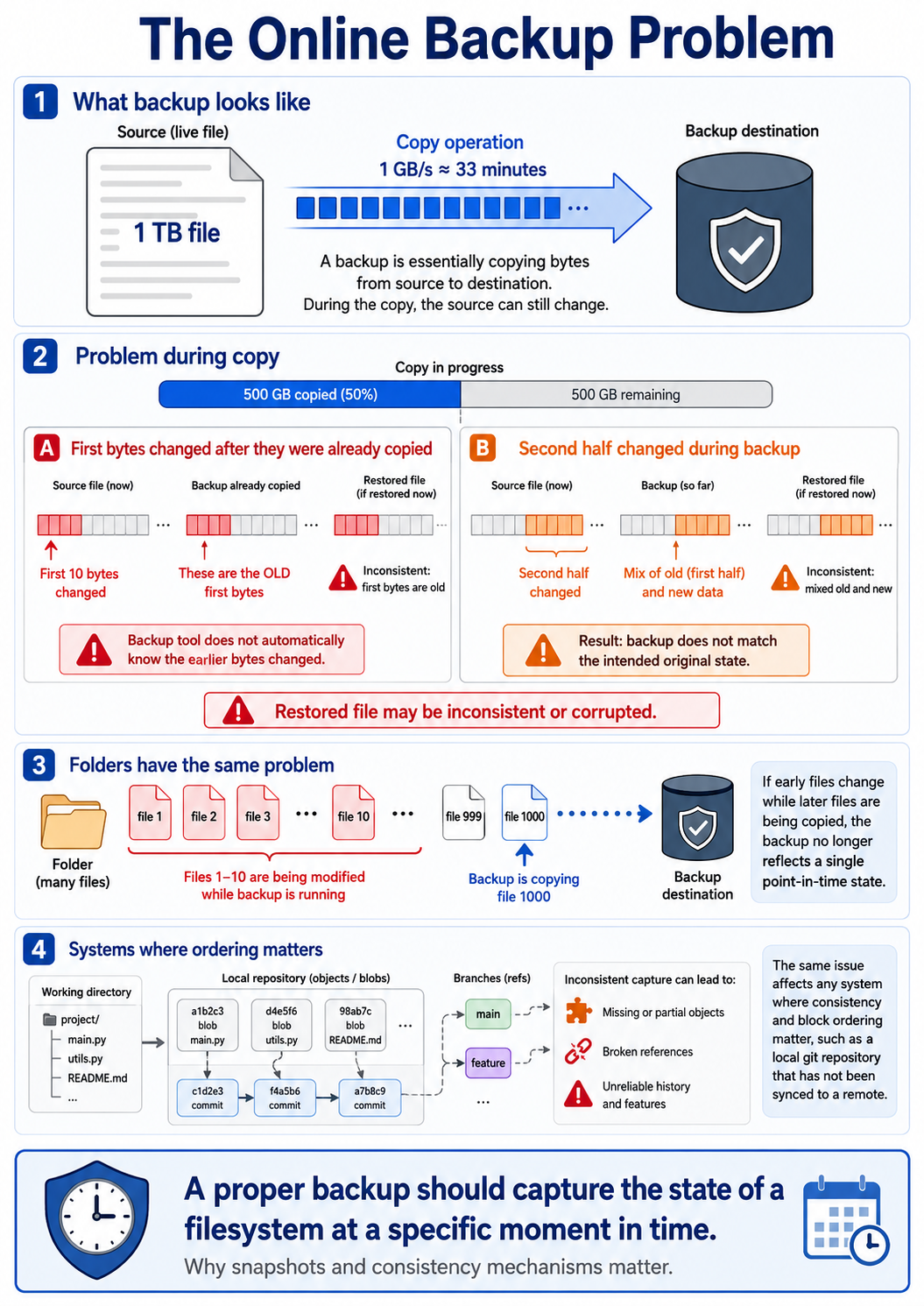
Traditionally if we think about it, a backup is a copy operation of a file or a block of data from a source to a given destination. Now, lets imagine a 1 TB file, even with a copy speed of 1 GB/s it will take roughly 33 minutes to copy this file from the source to the destination. In these 33 minutes that we are waiting for the file to copy there is nothing preventing the file from being modified.
Any software that you use to do this will open the file handle and then stream the bytes from a reader to a writer stream. There are various scenarios that can happen here when you have copied/backed up a part of the file.
For one, let’s consider the first 500 GB of the backup is complete, but someone modifies the first 10 bytes of the file. When this happens the backup tool doesn’t know what has changed, because the stream considers the first bytes to be processed already. Now, when the file is restored the intended file that was supposed to be backed up had changed. So when the file is restored it might be corrupted. The second scenario is that the second half of the file is modified; then in that case the second half would be different from what was intended to be backed up. This is essentially what the online backup problem is.
This issue plagues folders as well. If the first 10 files of the folder are modified while the 1000th file is being modified, the intended state of the backup is not achieved. The intent of the backup is always to capture the state of a filesystem at a specific time.
The similar things can happen for any system where the consistency and ordering of the data blocks matters. In the case of a git repository as well, if the blobs of the git repository are not backed up correctly, it might make a lot of git features unreliable; especially if the targeted git repository has not been synced with the remote repository.
A point in time
Capturing the state of a system at a specific time is the goal here. This is called a snapshot. When you take a snapshot you are freezing the source system at a point in time and copy the data. Since everything is frozen in time, the copy operation will copy exactly what was there at that point in time.
I just need to take a snapshot, right?
Sounds simple but here is where the nuances begin.
In terms of a filesystem there are mechanisms supported by underlying filesystem implementations like ZFS which use Copy-on-Write (CoW) OR Volume Shadow Copy Service (VSS) in Window providing the ability to take snapshots of the filesystem at an exact point in time.
In case of ZFS, it allows you to mount the snapshots and then back it up. But what if while ZFS took a snapshot there was an application writing to a log file or a database file at that very moment of the snapshot. There might have been an incomplete transaction which was in memory waiting to be flushed in to the disk. So from the perspective of the filesystem the data is consistent but from the perspective of the application the data is not.
In my experience many tools which say they take a “snapshot” actually don’t solve this problem at all or provide niche support for it. Your use case of that tool might not be solved yet.
Most tools don’t support it out of the box or support it partially
Take restic for example, a tool I have contributed to in the open source, it has about 30k+ stars on GitHub and is used by millions of hobby developers/home lab experts around the world and is also the core of many enterprise backup solutions. It doesn’t solve for the online backup problem on Linux machines; because it lacks underlying filesystem snapshot support integrations (LVM, ZFS, XFS etc.).
restic does support filesystem snapshots for Windows using the Volume Shadow Copy Service (VSS). This feature ensures that the filesystem is consistent based on the time of the backup; but comes with a caveat that only applications aware of VSS features will be safe from data corruption.
Consistency is key alright, how do I decide
Before we answer this question it is important to know what are the different consistency requirements. Once you understand this you can go deeper and find out what’s the solution required for your use case.
Crash Consistent
The first consistency requirement is crash consistent backups. To describe it simply, it will be the data on the system if you just unplugged the power supply of the device/machine at that specific time. Like described above, filesystems like ZFS and Windows VSS provide native FS level snapshotting mechanisms. Probably, you can use ZFS or VSS to snapshot your filesystem then take a backup of the snapshot created by the FS snapshotting tool. There wouldn’t be additional storage costs incurred for the FS level snapshot since the internal Copy-on-Write Mechanisms would handle that.
Once your backup is crash consistent, you can say with reasonable confidence that the state of the machine will be restored to that specific timestamp where the FS level snapshot was created. There are no risks of other processes modifying data as it is being backed up.
Application Consistent
The second consistency requirement is application consistent backups. In this requirement the backup application will have a mechanism to be aware of applications running on the system. This is simply called application-aware backups. The backup application can co-ordinate with the application to ensure a consistent state is captured.
Databases like PostgreSQL, MySQL etc hence come with their own tools for backup. Backing up a database is not as simple as copying the underlying filesystem of the database deployed. Database backup tools have built in mechanisms to isolate data ready to be flushed to the disk using Write-Ahead-Logs (WAL) files. In some more advanced databases like MSSQL even transaction logs can be backed up. Servers running MSSQL on Windows can leverage VSS since MSSQL ships a VSS writer which can co-ordinate with backup tools and freeze application writes for consistency while the backup is running.
Differences between crash consistent and application consistent backups
| Property | Crash-consistent | Application-consistent |
|---|---|---|
| Application participates | No | Yes, unless cleanly shut down |
| Captured state resembles | Sudden power loss | Controlled backup checkpoint |
| RAM-only data included | No | Normally flushed or deliberately excluded |
| Filesystem recovery | Journal replay may be needed | Usually already stable |
| Database recovery | WAL/redo recovery may be needed | Backup protocol defines the recovery boundary |
| In-flight transactions | Recovered or rolled back by crash recovery | Completed, rolled back or recorded according to application protocol |
| Main requirement | Atomic storage point-in-time image | Application coordination plus a valid capture mechanism |
| Typical mechanism | Volume/VM snapshot | VSS writer, DB backup API, guest agent or clean shutdown |
Thumb Rule
Copying a live source is unsafe; copying an atomic source snapshot is crash-consistent; coordinating the application before creating that snapshot makes it application-consistent.
Observations and Conclusion
From my experience the online backup problem is a afterthought for filesystems more often than it is for database backups. The reason being that we think that files are not modified in off business hours and filesystems are assumed to be static for the entire time of the backup run. This might not always be true.
Consider an enterprise environment where there are developers mounting storage from a common high-speed fileshare for their day to day work. The size of the file share is about 4-5 TB where there might be more than one volume per team. Depending on storage speed, network speed, compute and memory a backup of 4-5 TB might take anywhere between 6-8 hours on an average. Now, while this backup is running and for whatever reason it extends beyond a certain time period, developers might start working on their repositories and files. Developers might also be working late nights to get a release out or solve a production issue. There might be cronjobs and background processes which modify files. In the age of AI, there might be so many automations that people build for themselves which keeps modifying files on their system in the form of logs, in the form of config files, output files etc.
In case of database backups, you see more system administrators involve their database administrators who understand the consistency guarantees required by their application. Therefore, you will see database backup solutions are often more complex to configure and execute.
As much as backup is important, the recoverability of it is important. A backup might restore but is it the correct state you wanted to restore to? Take a moment and analyse your backup strategy.
Series roadmap discussing consistency
Mastering Disaster Recovery - Part 6 - Crash Consistent Backups & Recovery - Filesystems
Mastering Disaster Recovery - Part 7 - Application Consistent Backups & Recovery - Databases
About the author
As a software engineer with 5 years of experience, I work on the core backup & recovery features of Zmanda, an enterprise backup and recovery product. I have strong skills in software design, cloud-native development, and delivery. I also foster effective communication and collaboration among the development team, architects, product owners, and business owners. I contribute to some open-source projects and share my technical insights on my blog.
Comments
Join the discussionNo comments yet. Be the first to comment.
Disaster Recovery
In this series, I will explain some of the key challenges, solutions and findings with respect to disaster recovery


